macOS
Waypoint
Close the tab. Find it again.
A link keeper for people with too many open tabs. Drag a tab into your browser's side panel, close it, and find it again by where you work. The page you are on brings its group into view by itself.
- Chrome
- Edge
- Brave
- Helium
- Firefox
- Zen
- Safari
Free on your Mac · macOS 13 Ventura or later · Apple silicon · notarized by Apple · no account needed
The Windows app is in preparation · subscribe on GitHub to hear when it is out
Version 0.19.0 · November 10, 2026What's new
Other ways:Signed file for Firefox and ZenZip for Chromium browsersAdd to ChromeWindows: in preparation ↗All releases ↗Privacy
Waypoint in 75 seconds
Save
Save without thinking
Drag a tab into the side panel and close it. Drop it on a group and it is filed there; drop it anywhere else and it waits in the Inbox. There is no dialog to fill in.
Read it later — or let it expire
Found something you want to read or watch, but not now? Save it to Later — with the clock button in the browser panel, ⌥⇧L, the right-click menu, or Save for later in the app and the web app. Each link stays 90 days, the days left at the end of its row. Move it into a group and it stays for good; let it run out and it quietly leaves, still findable under Expired. A macOS notification tells you the day before. Unread items from Pocket, Instapaper, Omnivore, Readwise Reader and wallabag can go straight into Later.
Find
Organised by where you work
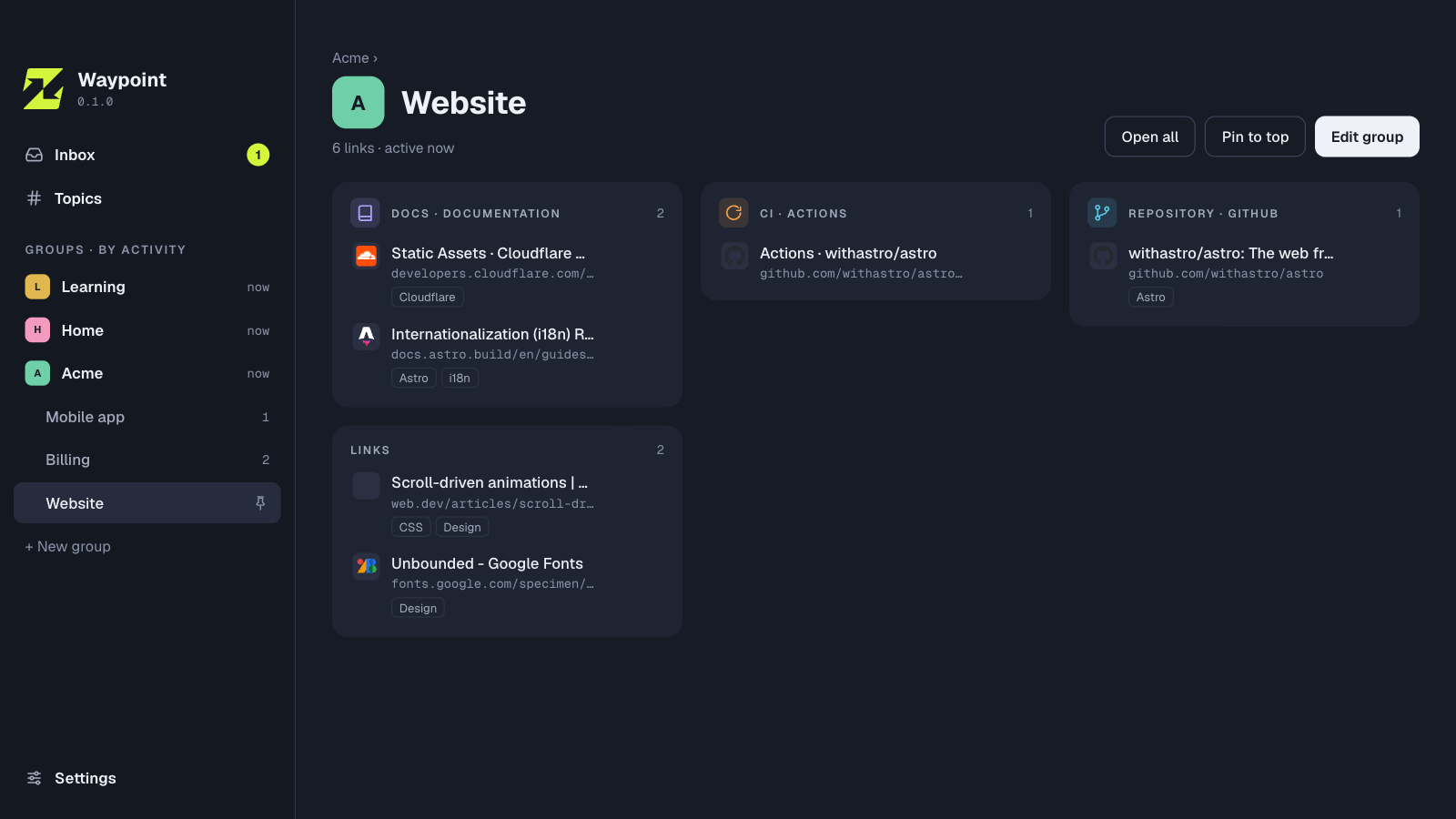
Groups are your companies, projects and areas of life, and they nest: Acme › Billing. Inside a group, links are bundled by what they are, such as repository, CI or docs. Topics like AI or Design cut across everything. Groups sort by when you last worked in them.
The page you are on shows its group
Open a page and Waypoint brings its group into view: by an exact match, by your own URL rules, or by links you saved nearby.
Find it again
Search runs over titles, addresses, each page’s own description and your topics: #ai #mcp cleaner. The topic map shows what you have collected and which topics belong together.
Topics on groups — #work with #ai
Give a group topics like #work, #projects or #ai; the groups inside it get them too. A group can sit under Work in your structure and still be found as #ai. The filter above your groups combines them — #work with #ai shows your work projects with AI — and a search for a topic finds the links in those groups as well.
A group opens as a tab group
Links you open from a group gather in a tab group of the same name and colour, in Chrome, Edge, Brave, Helium, Firefox and Zen — one at a time, the next joins it. A project stays together in the browser too. Only tabs Waypoint opens are grouped; switch it off for a group in its settings.
Done for now? Archive it
Archive a group you finished with — the company you left, the project that ended — and it leaves the sidebar, the panel, search and “You are here”, with everything inside it. Nothing is deleted: the Archive keeps it whole, searchable, and Restore brings it back. Single links too. A group you share asks first: archive it for everyone, and the others choose to keep their own copy, or only for you, and they keep working with it.
Your data
Your browsers, your Mac
One side panel for Chrome, Edge, Brave, Helium, Firefox and Zen; Safari comes inside the Mac app. A small menu-bar app keeps the links in an encrypted database on your Mac. No account needed, and it works offline. Each group can open its links in the browser and profile you choose.
Your Macs in sync, shared groups — end-to-end encrypted
With a Waypoint Cloud account (free to start, in beta), your links are the same on every Mac and in the browser at waypoint.vizis.cz. Share a group with people, a team or a whole organisation; your own notes and topics stay yours. Everything is encrypted on your device — the server stores only what it cannot read.
Waypoint Cloud runs on Cloudflare, the network behind a large part of the web, so the servers, the database and the backups are maintained by people who do nothing else. Your data is stored in the EU and backed up every night. And because it is encrypted on your device, not even Cloudflare can read it.
Private stays private — even on a shared screen
Mark a link or a whole group as private: it is never shared, not even when it sits in a shared group. In a call or on a projector, presenting mode hides everything private at once — in the app, every browser panel, search and for AI agents. With a 6-digit code it stays hidden until you unlock it with the code or Touch ID, so nobody can switch it off while you are away from your Mac.
A log that stays on your Mac
If something goes wrong, Waypoint notes the error in a file on your Mac — never your links, titles, groups or notes — and sends nothing. Settings › Data › Diagnostic log opens it in Finder, to attach to an email or an issue.
And also
A start page of your own
Turn on a start page and Waypoint serves it on your Mac at a local address — it works offline and needs no server. Pages, sections and tiles are groups and links you keep in Waypoint; type to find a tile, Enter opens it. In Brave it can open on every new tab, in other browsers the panel has a Start page button. Coming from Dashy? Import its conf.yml and nothing is added twice.
Style it your way
Give your start page a style: Nord, Dracula, Matrix, Vaporwave or Paper, and two hidden ones for those who click around. Or make your own: a small CSS file with your colours, written by hand or by an AI from one sentence. Share it by sending the file. A style can’t load anything from the internet, so trying one is safe.
A Mac app that feels like one
A menu bar with the shortcuts you expect — ⌘N, ⌘F, ⌘1–4 — right-click menus on links and groups, light or dark as your Mac is set, and a window that comes back where you left it. Things move the way macOS moves: sheets, a selection that glides, a translucent sidebar. The web app follows the same look.
Move in from where you are
Bring everything from Raindrop — collections with their icons, notes, highlights, tags and the date you saved each link. Pinboard, Pocket, Instapaper, Karakeep, Linkwarden, Readwise Reader, wallabag, Omnivore, OneTab, Toby and every browser’s bookmarks come in too. You see what will arrive before anything is saved, and importing again adds only what is new.
In your language
Waypoint speaks English, German, Czech, Polish, Spanish, French, Italian, Dutch and Portuguese — the app, the browser panel and the web app. It follows your system, or you choose.
Let your agent tidy up
Waypoint has an MCP server built in. Claude Code, Codex and other agents can sort your Inbox, tag links and suggest a structure. Every change an agent makes is logged, and you can undo its whole session in one click.
Ready when you are
Free on your Mac · macOS 13 Ventura or later · Apple silicon · notarized by Apple · no account needed
The Windows app is in preparation · subscribe on GitHub to hear when it is out
Other ways:Signed file for Firefox and ZenZip for Chromium browsersAdd to ChromeWindows: in preparation ↗All releases ↗Privacy
Read the guide
Step by step from the first start: install the app, connect your browsers, then save, sort and find your links — and let rules and AI agents take over some of the work.
Open the guide →